
Skolo · A calmer school life
Never miss your child's event again.
Skolo scans the emails from schools and clubs you choose, plus any flyer, WhatsApp message or text you paste in, and turns it all into one clean dashboard for your child's activities, with reminders so you never miss a deadline or event.
Free to download · iPhone · iOS 16+
See it work
Paste a message. Watch Skolo find the date.
This is exactly what happens inside the app. Try it with a real example below.
Press Scan for dates and Skolo will pull the event straight out.
Features
The quiet little assistant for school life.
Built for the school-letter, WhatsApp-thread, three-kids-in-three-clubs life. Less mental load, fewer missed deadlines.
-
01
AI scanning
Paste a message or photograph a letter or PDF. Skolo pulls out events, dates, times, actions, payments, safety notes (allergens, kit needed), closures, location and booking links.
-
02
Smart date detection
Flags when a message's stated weekday doesn't match its date, and resolves vague dates like "Saturday" or "the 13th" using real calendar maths, not AI guesswork.
-
03
One dashboard per child
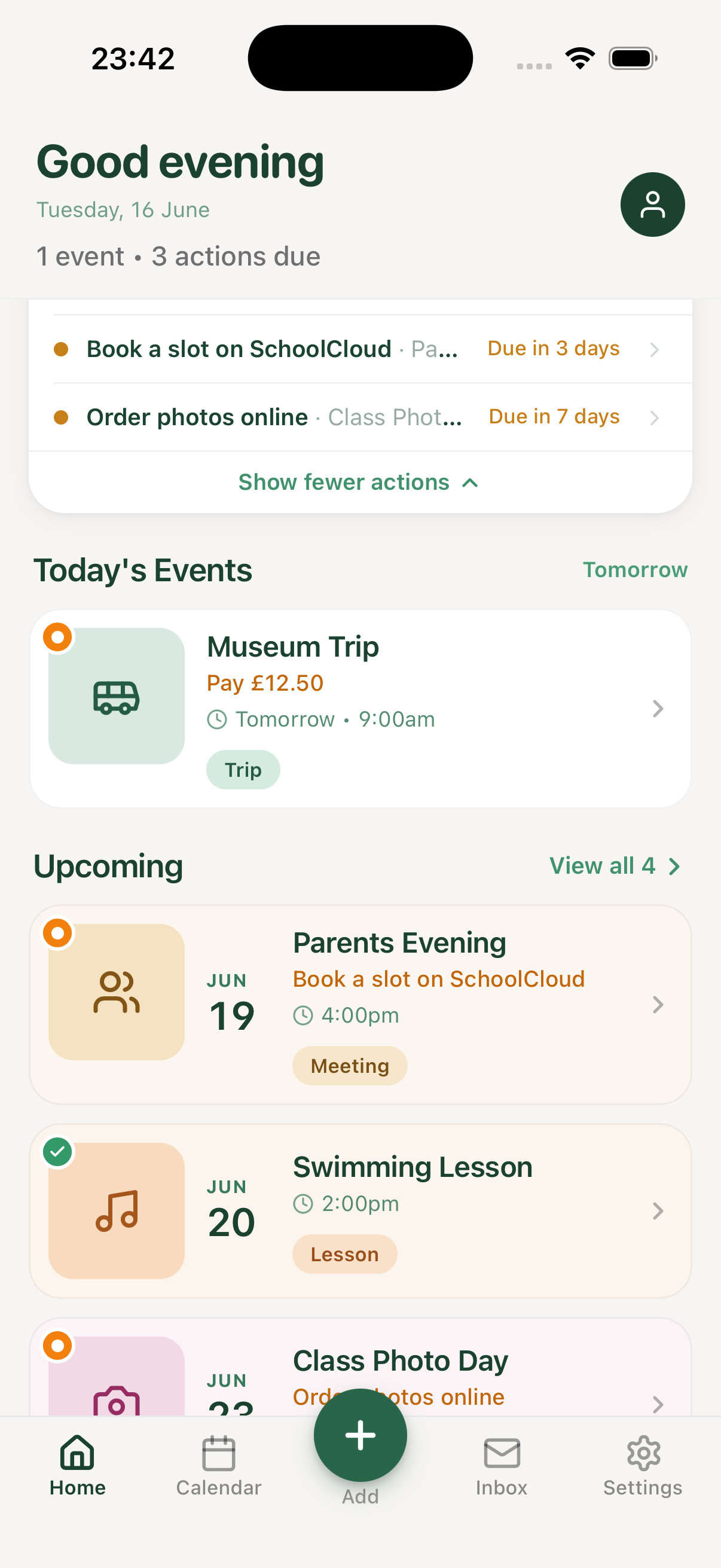
Calendar and list views, grouped by day with today and upcoming up front. Every school and club colour-coded so nothing blurs together.
-
04
Reminders that respect your day
Morning-of alerts for everyone. On Pro, add day-before, week-before and "new event found" nudges. Only when they matter.
-
05
Apple Calendar sync
Push any event straight into your iPhone calendar, so it sits alongside everything else you already track.
-
06
Family sharing
Invite your partner: same children, same events, one shared dashboard. One subscription covers both of you.
How it works
From bag-rummage to booked-in, in seconds.
-
Step 01
Choose your senders
Add the schools, nurseries and clubs you want Skolo to watch. We only scan emails from senders you've explicitly approved.
-
Step 02
Skolo reads, you approve
Every detected event, deadline and payment is queued for a one-tap review. Paste WhatsApps or snap a flyer to add things by hand.
-
Step 03
Calm, well-timed reminders
Morning-of, day-before and week-ahead nudges. Snooze, mark done, or jump to the original email in one tap.
Inside the app
The screens you'll actually use.
No dashboards. No notification spam. Just the screens you want to open when school life gets busy.
New in version 1.2.
Three updates rolling out this month.
-
Family sharing
Invite your partner. Share one Skolo.
Same children, same events, one calendar. One subscription covers both of you. No more forwarding, no more "did you see this?". Just the two of you, on the same page.
-
Free AI scans
Three free AI scans, every month.
Every parent, free plan included, now gets 3 AI scans a month with no subscription needed. Try it on real messages before you upgrade.
-
Smarter date detection
Weekday vs date mismatch.
Skolo now catches when a message's stated day doesn't line up with its date, and flags it before it lands in your calendar. So you're never caught out by a mismatched weekday like "Saturday the 13th" again.
Plus general bug fixes and reliability improvements.
Update on the App StoreFrequently asked
A few questions, answered.
Have something else on your mind? Write to hello@skoloapp.com.
-
Yes. We only ask for read-only access to senders you explicitly approve. Your data is encrypted at rest, never sold, and can be deleted entirely from Settings.
-
Anything that arrives by email, WhatsApp, SMS, flyer or letter. We recognise ParentMail, ClassDojo, Arbor, SchoolCloud, Seesaw and most UK school newsletters out of the box. You choose which senders Skolo is allowed to scan.
-
Very. Skolo flags anything ambiguous for a one-tap review. Nothing reaches your dashboard without your approval.
-
Yes. Free covers one child; Pro adds unlimited children, each with their own colour-coded schools and clubs. Skolo links every event to the right child, so the dashboard stays clean even with three kids in three clubs.
-
Free to download and use. Manual entry and 3 AI scans a month are always free. Skolo Pro unlocks unlimited AI scans, unlimited children, full reminders, Apple Calendar sync and family sharing for £4.99/month or £39.99/year, with a free trial so you can see how it works first.
Pricing
Free to start. Pro when you're ready.
Manual entry is always free, with no limits. Pro unlocks automatic scanning, and one subscription covers your whole family.
Start free. Upgrade anytime with a free trial. One Pro subscription covers both parents.
Download on theApp StoreOut now
Skolo is live on the App Store.
Free to download. Set it up in a couple of minutes and let this term run itself.
on your phone